Open Wordfast Pro and click  .
.
The TXML perspective appears.
Click Edit
> Preferences > Translations > Auto-Suggest.
The Auto-Suggest dialog box appears.
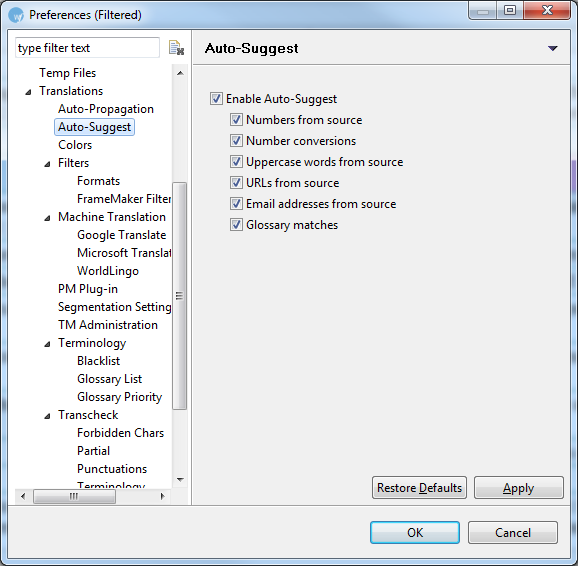
Select Enable Auto-Suggest checkbox.
Enable the following auto-suggest options, if required:
|
Select |
to view suggestions in target segment for... |
|
Numbers from source |
numbers that appear in the source segment. |
|
Number conversions |
number conversions based on different rules. For example: If the file is being translated from English (United States) to German (Germany) $1,000 appearing in source segment will be suggested as $1.000 in the target segment. |
|
Uppercase words from source |
upper case words that appear in the source segment. |
|
URLs from source |
URLs that appear in the source segment. |
|
Email addresses from source |
email addresses that appear in the source segment. |
|
Glossary matches |
term matches from synchronized glossary found in the source segment. |
Click Apply
and OK.
The Auto-Suggest option is enabled.